Shadcn Tables Blocks

High-performance data table components built with React, TypeScript, and shadcn/ui, featuring integrated TanStack Table support, type-safe filtering, and seamless pagination. These modular Tailwind CSS blocks are designed to handle complex datasets with ease, providing a professional and responsive administrative interface for your web applications.

Table 1 Free

Recent invoices card with a status toggle group showing counts, invoice, status, method, issued and sortable amount columns, a row menu to copy the ID or mark paid, and a visible total line.

Table 2 Free

Quote card with line items, unit price, quantity stepper buttons that remove an item at one, footer rows for subtotal, annual discount, sales tax and total, an annual billing switch and reset button.

Table 3 Free

Launch checklist with All, Open and Done tabs, a progress bar, done checkboxes that strike through tasks, owner avatars, due dates and a status dropdown with four states per row.

Table 4 Free

Storefront products card with a search field, product icon, name and SKU, category, inventory and price columns with sorting, and a row menu to copy SKU, duplicate, archive or delete.

Table 5 Free

Workspace members card with search and role filter, avatars with presence dots, role pill dropdown with descriptions, status and last active columns, and a selection bar to set roles or remove members.

Table 6 Free

Platform tickets card with status tabs and counts, sortable key and priority, owner avatars, label badges, a status pill dropdown per row, a columns visibility menu and five row pagination.

Table 7 Free

Expense claims card with row checkboxes, employee, payout method, date, status and amount columns, a total footer, and a selection bar to approve, reimburse or delete claims with confirmation.

Table 8 Pro

Content calendar card with publish progress, row checkboxes, author, status, priority, date and notes columns, start, pause and publish icon buttons with spinners, bulk actions menu and a details side sheet.

Table 9 Pro

Community members card with search, status toggle, sortable member, reputation and last seen columns, role badges, channel icons, featured switches, row menus, rows per page select, numbered pages, profile and add member dialogs.

Table 10 Pro

Support agents card listing 42 agents with search, sortable name, status, role and last active, team badges, edit and shift actions, bulk shift buttons, add or edit dialog and numbered pagination.

Table 11 Pro

Vendor bills card with line tabs and counts, search, owner filter, sortable vendor, received and amount columns, bulk mark paid or review, row menu with duplicate, a details dialog and total footer.

Table 12 Pro

Receivables card with outstanding, overdue and collected tiles, status checkbox filter, search, collected progress bars, due notes, bulk paid, void and delete, CSV export, invoice detail sheet and new invoice dialog.

Table 13 Pro

Paying subscribers card with search and card brand filter, avatars, masked card numbers with expiry warnings, interest badges, sortable click rate bars, bulk copy emails and delete, and an average click rate footer.

Table 14 Pro

Client requests list with status tabs and counts, search, billing and unassigned filters, sort and CSV export menu, request notes, assignee avatars with assign menu, task and comment badges, and bulk status actions.

Table 15 Pro

Aligner cases card with stage toggle group or mobile select, search, row numbers, sortable patient, created and days in stage, stalled badges, move to next stage menu, bulk stage moves and pagination.

About Shadcn Tables Blocks

A data table organizes records into rows and columns and gives people the tools to find, compare and update them, from search and filters to sorting, bulk actions and pagination. These 25 shadcn table blocks cover the tables admin dashboards need most: invoices and payments, members and contacts, tasks and tickets, products, orders and inventory.

Like the rest of our shadcn blocks, every table is built with React, TypeScript and Tailwind CSS on top of shadcn ui components such as Table, Card, Badge, Checkbox, DropdownMenu, InputGroup, Select, Dialog and Sheet. Most blocks use @tanstack/react-table for sorting, filtering and selection, every action updates real component state, and each one ships with sample data, an empty state and responsive column rules that follow your light and dark theme.

Key Elements of a Data Table

  • Header with context: a title plus a live summary, such as the amount outstanding or how many items are on shift.
  • Toolbar: search, status tabs or filter menus that match the way users look for records.
  • Readable cells: status badges, avatars, progress bars and right aligned tabular numbers for amounts.
  • Row actions: a menu or inline buttons for the common edits, plus checkboxes and a bulk bar for many rows at once.
  • Footer: totals, a result count or pagination so users always know where they are in the list.
  • Empty state: a message and a reset action when filters return no rows.

Where and Why to Use Table Blocks

Building a good table takes more time than it looks: column priority on small screens, filter state, selection that survives sorting, keyboard friendly menus and an empty state. These blocks solve those details once, so you can focus on your data. Because they are standard shadcn components styled with Tailwind CSS, they match the cards, forms and dialogs in the rest of your shadcn ui dashboard.

  • Billing and finance: invoices, receivables, expense claims, card transactions and payouts.
  • User management: workspace members, support agents, subscribers and contact directories.
  • Project and task tracking: checklists, tickets, sprint tasks, client requests and project lists.
  • E-commerce operations: product catalogs, inventory, wholesale orders and stock levels.
  • CRM records: people lists with segments and a detailed contact record.
  • Industry tools: case pipelines, property listings and content calendars.

Table Blocks in This Collection

Billing and finance

  • Table 1: A compact invoice list for a dashboard home page where users mostly check what is still unpaid.
  • Table 2: Use it on a quote or checkout review screen where customers adjust quantities and see the total update.
  • Table 7: Fits approval workflows such as expense claims, where a manager processes several rows together and confirms deletions.
  • Table 11: An accounts payable view for teams that move supplier bills from draft through review to paid.
  • Table 12: A receivables workspace that combines summary tiles, partial payment tracking and invoice creation in one place.
  • Table 16: Choose it for bank or card activity, where date ranges and spending categories are the main filters.
  • Table 22: Suits subscription billing pages that need fees, net payouts and downloadable receipts.

People and contacts

  • Table 5: A workspace settings table for changing roles, one member at a time or in bulk.
  • Table 9: Built for community or forum admins who feature, suspend and add members.
  • Table 10: A staffing roster for support teams that manage shifts across a long, paginated list.
  • Table 13: Fits newsletters and memberships, where card expiry and engagement matter more than roles.
  • Table 19: A CRM people list for teams that segment contacts and edit them in a side panel.
  • Table 21: Use it for a single record page, where a two column table reads better than a form until the user chooses to edit.

Tasks, tickets and projects

  • Table 3: A lightweight launch or onboarding checklist with progress at the top.
  • Table 6: An issue tracker table for engineering or operations tickets sorted by urgency.
  • Table 8: Fits editorial teams that move pieces from draft to published and need notes at hand.
  • Table 14: An agency inbox for client requests that carry notes, assignees and billing type, shown as a list rather than a grid.
  • Table 15: A stage based pipeline, here for aligner cases, that flags records waiting too long.
  • Table 17: A client project overview with archive tabs and a card view for presentations.
  • Table 23: A sprint planner that groups tasks and switches between list and board.

Products, orders and inventory

  • Table 4: A storefront product list for small catalogs with quick duplicate and archive actions.
  • Table 18: Suits larger inventories that need page sizes, status filters and a spreadsheet export.
  • Table 20: Use it for B2B orders where each order has several line items worth checking without leaving the list.
  • Table 24: Fits wide data sets like real estate listings, with a pinned first column and a card grid alternative.
  • Table 25: A long stock list inside a fixed height card where the header row stays visible while scrolling.

Similar Block Categories

  • Stat Cards: place KPI cards above a table to summarize the same data.
  • Empty State: use a richer empty state when a table has no records yet.
  • Form Layouts: build the full create and edit pages behind a table’s add button.
  • Modal Dialogs: confirm deletes or collect quick edits from a row menu.
  • Kanban Board: offer a board view of the same tasks or deals.

Accessibility

The blocks use real table markup from the shadcn Table component, and controls carry descriptive labels: row checkboxes read “Select” plus the record name, select all checkboxes have their own label, sort buttons use aria-labels like “Sort by amount”, and row menu triggers name the record they act on. Action columns have an sr-only header, pagination sits in a nav with aria-label=“Pagination” and marks the current page with aria-current in Table 9, 10, 16, 18, 19 and 24. Table 20 links its expand button to the detail row with aria-expanded and aria-controls, Table 21 uses th cells with scope attributes, and Table 7 and 21 announce changes through aria-live regions.

Some details are worth adding in your project. The sortable headers do not set aria-sort, so screen readers do not hear the current sort order. In Table 19 and Table 20 a whole row responds to clicks, which only works with a mouse, although each row also has a keyboard reachable button for the same action. Status colors are always paired with a text label, so keep that pattern when you add new states.

Tables FAQ

A data table lists records such as invoices, users, orders or tasks in rows and columns, and adds tools to work with them: search, filters, sorting, row selection, pagination and per row actions. It is the main way admin panels let people scan, compare and update many records at once.

They are complete table sections built with the shadcn ui Table component and Tailwind CSS. Each block already includes its toolbar, sample data, status badges, row menus and empty state, so you replace the data and wire the actions instead of building a table from scratch.

Tables are where users spend most of their time in an admin app. Clear status badges, sensible column priority on small screens, fast filtering and bulk actions decide whether a task takes seconds or minutes, and they reduce mistakes when people change many records at once.

A title with a short summary, a search field or filters that match how people look for records, sortable columns for numbers and dates, readable status badges, a row actions menu, an empty state for no results and pagination or a total row. Bulk actions become important as soon as users handle more than a few rows.

Yes. Table 1 to Table 7 are free. Install the first one with npx shadcn@latest add @shadcnuikit/tables1 and replace the number with 2 to 7 for the others, for example npx shadcn@latest add @shadcnuikit/tables7. Table 8 to Table 25 are part of All Access.

Most of them. Table 1, Table 3, Table 4, Table 5, Table 6, Table 9 to Table 20, Table 22 and Table 24 define their columns with ColumnDef and use useReactTable for sorting, filtering, selection and pagination. Table 14 uses it headlessly to drive a list layout. Table 2, Table 7, Table 8, Table 21, Table 23 and Table 25 work with plain React state.

Table 6, Table 15 and Table 22 use previous and next buttons with a fixed page size. Table 9, Table 10, Table 18 and Table 24 add a rows per page Select, and Table 9, Table 10, Table 16, Table 18, Table 19 and Table 24 show numbered page buttons, with gaps for long lists in all of them except Table 9.

Table 5, Table 7, Table 8, Table 9 to Table 20 and Table 22 have row checkboxes. When rows are selected, the toolbar switches to a bulk bar or a selected menu, for example approve and reimburse in Table 7, set role in Table 5, move to stage in Table 15, set status in Table 18, copy emails in Table 13 and download receipts in Table 22.

Yes, in three blocks. Table 12 exports the visible invoices to a CSV file and has a Print list item, Table 14 exports the current tab with Export view as CSV, and Table 18 downloads the inventory as CSV. Table 22 downloads payment receipts as a text file. All of them build the file in the browser with a Blob.

Add and edit dialogs are in Table 9, Table 10, Table 12, Table 16, Table 17, Table 18, Table 23 and Table 24. Table 19 uses a Sheet form with inline validation for both adding and editing. Detail views open in a Sheet in Table 8, Table 12, Table 17, Table 22 and Table 24, and in a Dialog in Table 9 and Table 11. Table 21 edits a single record in place.

Table 20 expands each order into a line item panel with a subtotal, shipping and total, and has an Expand all button. Table 23 groups tasks by status, priority or team with collapsible group rows and can switch to a board view.

Table 17 and Table 24 have a list and grid ToggleGroup that renders the same filtered rows as cards in a sm:grid-cols-2 lg:grid-cols-3 grid. Table 23 switches between a grouped list and a horizontally scrolling board.

Lower priority columns get classes like hidden sm:table-cell or hidden lg:table-cell, and the first column repeats key details such as status or date in a small line under the name. Table 24 instead keeps a wide table that scrolls sideways with the property column pinned, and Table 25 caps the body at 420px with a sticky header.

Each block starts from a typed array such as initialInvoices, initialMembers or initialOrders and keeps it in useState. Load your records into that state instead, keep the same fields or rename them in the column definitions, and replace the setState calls inside actions like markPaid, removeMembers or updateStatus with requests to your API.
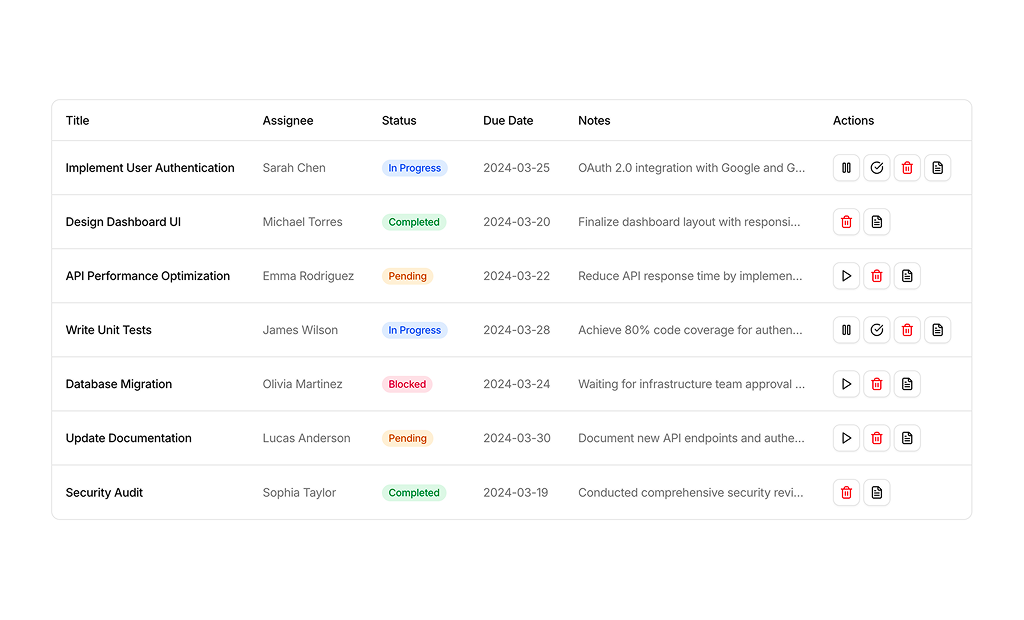
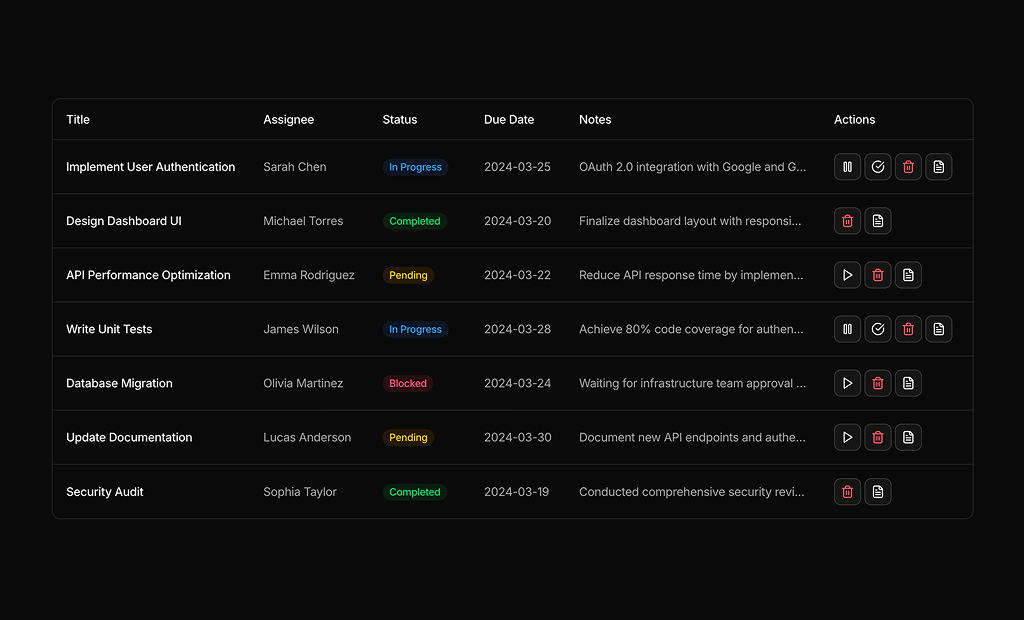
Table 16 filters transactions with a range Calendar in a Popover, including a Last 7 days shortcut, and imports the DateRange type from react-day-picker. Table 23 lets users set or clear a due date per task with a single date Calendar. Table 19 filters people by year added and by days since last touch with Select menus.
shadcn tables blocks
Unlock Premium Blocks & Sections
Premium blocks are part of All Access. One license unlocks the whole Shadcn UI Kit, so you can build complete pages and products instead of single sections.
  • 550+ blocks for landing pages, stores, dashboards and apps
  • 16 admin dashboards and 17 ready-made apps
  • 5 premium Next.js website templates
  • 560+ component variants and 70+ examples
  • Install with the shadcn CLI or from your AI editor through the MCP server
  • Lifetime updates, including every new block we release
Unlock Now

One-time payment, no subscription.