Shadcn Dashboard Shell Blocks

Dashboard shell blocks built with shadcn/ui that combine an inset sidebar, grouped navigation, user menu, and a site header around an empty content area. Drop them in as the starting point for admin panels, analytics dashboards, and internal tools.

Dashboard Shell 1 Pro

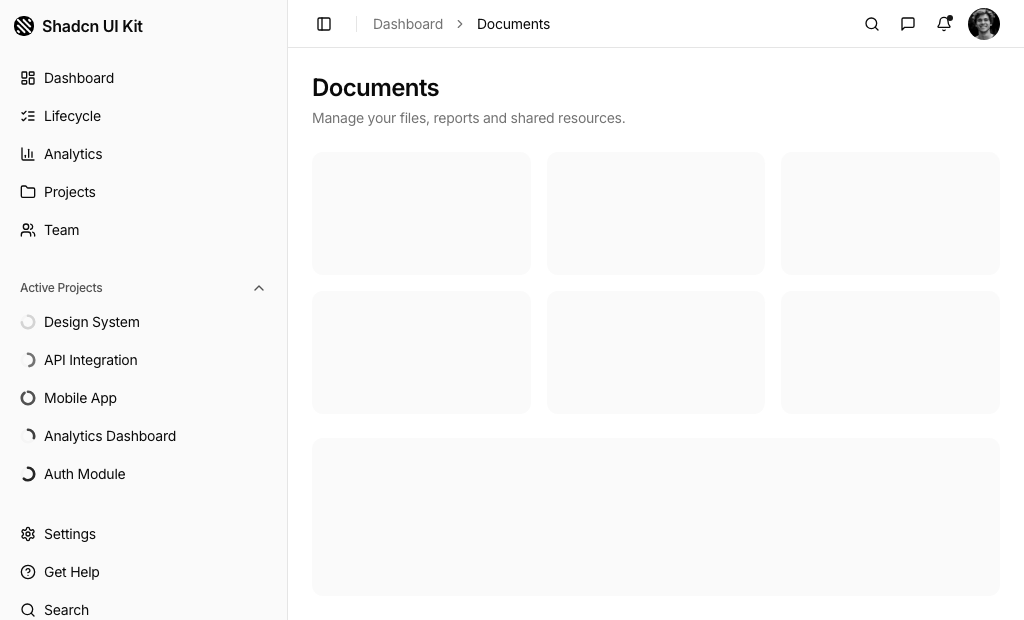
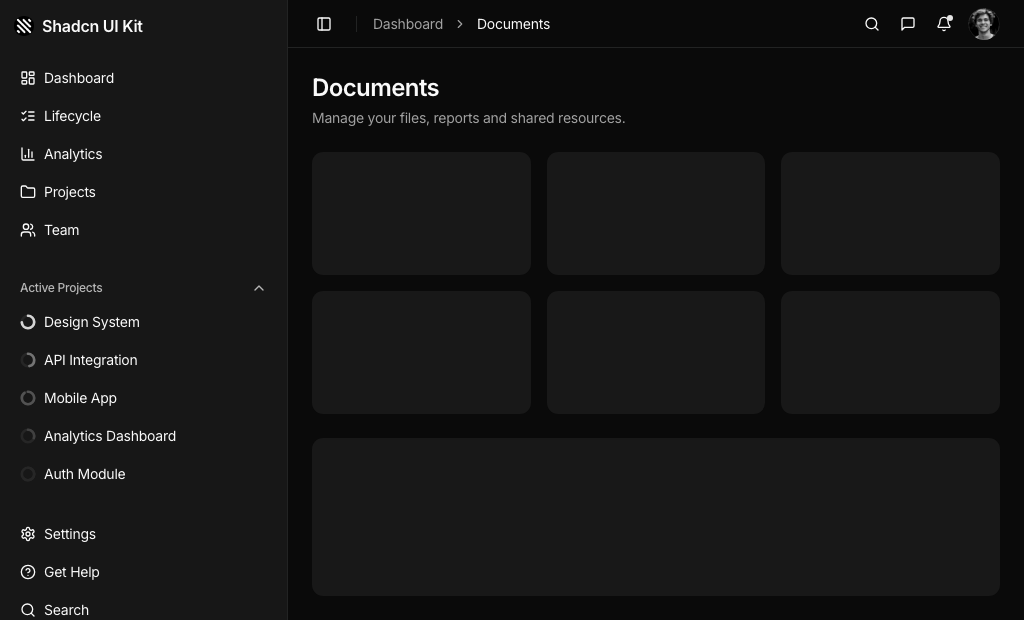
Sidebar shell with main links, a collapsible Active Projects list with progress rings and item menus, bottom links, and a header with breadcrumb, command search, message and notification popovers and an avatar menu.

Dashboard Shell 2 Pro

Double sidebar shell with an icon rail of tooltipped links and avatar menu beside a panel holding a workspace switcher and grouped settings links, plus a header with title and Documentation button.

Dashboard Shell 3 Pro

Narrow rail shell with a framed logo, stacked icon and label links, Support and Apps shortcuts and an avatar menu, plus a header with sidebar toggle, page title and right aligned breadcrumb.

Dashboard Shell 4 Pro

Slim rail shell with round icon links and an avatar menu, a tall muted header with title, subtitle, product search and round notification, profile, theme and settings buttons, and content cards overlapping the header.

Dashboard Shell 5 Pro

Top navbar shell with mega menu dropdowns, icon actions and avatar inside a tall muted header with a Dashboard title, Filter and Create buttons, overlapping content cards and a collapsible sidebar on phones.

Dashboard Shell 6 Pro

Sticky top navbar with logo, page links, icon actions and a greeting avatar, above a static sidebar of Public, My Activity and Categories groups showing count badges, with a sheet version on phones.

Dashboard Shell 7 Pro

Floating sidebar with logo, avatar menu, goal progress with budget and spent figures, a grid of service tiles and an upgrade card, beside a top bar with dropdown menus, command search, messages and notifications.

Dashboard Shell 8 Pro

Floating sidebar that collapses to icons, with a Quick Create button, inbox button, main links and a Documents list with item menus, plus a floating header with breadcrumb, command search, popovers and avatar menu.

Dashboard Shell 9 Pro

Top navigation shell with logo, dropdown menus with an active underline, theme toggle, mail and bell buttons and avatar menu, that renders the same links in a sidebar sheet only on phones.

About Shadcn UI Dashboard Shell Blocks

A dashboard shell is the frame that surrounds every page of an admin app: navigation, a header with search, inbox and account controls, and a content region. These nine shadcn dashboard shell blocks cover that frame in different shapes, from a classic sidebar to icon rails, double sidebars, floating cards and top navigation bars. The content area is intentionally left as placeholder tiles, so the shell never dictates what your pages show.

Each shell is written in React and TypeScript and assembled from shadcn ui components such as Sidebar, NavigationMenu, Command, Popover, DropdownMenu, Breadcrumb and Avatar, all styled with Tailwind CSS theme tokens. Pair them with our other shadcn blocks, such as stat cards, charts and tables, to turn the empty frame into a full dashboard.

Key Elements of a Dashboard Shell

  • Primary navigation: a sidebar, an icon rail or a horizontal menu that stays on every page.
  • Header utilities: search, messages, notifications and a theme or settings control.
  • User menu: an avatar dropdown with account, billing, notification settings and log out.
  • Context cues: a breadcrumb, a page title or an active state that shows where users are.
  • Secondary areas: workspace switchers, project lists or goal widgets for apps that need more than links.
  • Content region: an inset area with consistent padding that holds each page.

Where and Why to Use Dashboard Shell Blocks

The shell is the first thing users see after signing in and the part they use most often. Building it from scratch means solving collapsing sidebars, mobile sheets, keyboard shortcuts and popover positioning before any real feature exists. A shell block gives you those pieces working together, built on shadcn components that already follow your Tailwind CSS theme.

  • SaaS admin panels: a sidebar with grouped links, command search and inbox popovers.
  • Developer platforms: a double sidebar with a workspace switcher for APIs or environments.
  • Community and support portals: a top navbar with a grouped sidebar that shows counts per category.
  • Finance or service apps: a floating sidebar with goal progress, budget figures and service shortcuts.
  • Product suites: a horizontal mega menu that groups dashboards, apps and pages.

Dashboard Shell Blocks in This Collection

  • Dashboard Shell 1: The most complete classic layout. Choose it for document or project heavy apps that want progress per project in the sidebar and command search, messages and notifications in the header.
  • Dashboard Shell 2: Built for apps with many settings pages across several workspaces, where a slim icon rail handles top level areas and a second panel handles the details.
  • Dashboard Shell 3: A compact rail where every item keeps a visible label, useful when icons alone would be ambiguous.
  • Dashboard Shell 4: A softer, card based look with a tall header that cards overlap. Fits store or product admin apps that want a prominent title and search.
  • Dashboard Shell 5: Header first navigation with mega menu panels and page level Filter and Create actions, for apps where most work starts from the top bar.
  • Dashboard Shell 6: Suits forums, help centers and Q and A tools that need a navbar plus a category sidebar with counts.
  • Dashboard Shell 7: Turns the sidebar into a small dashboard of its own, a match for budgeting, booking or service apps that want goals and shortcuts always visible.
  • Dashboard Shell 8: A modern floating look for both sidebar and header, with a primary Quick Create action that stays visible even in icon mode.
  • Dashboard Shell 9: A top navigation shell that only uses a sidebar on phones, so desktop users get the full width for content.

Similar Block Categories

  • Page Layouts: lighter app frames when you need fewer header features.
  • Dashboard Dropdowns: richer account, notification and workspace menus for the header.
  • Stat Cards: replace the placeholder tiles with real metrics.
  • Charts: fill the large content panel with analytics.
  • Tables: list records inside the frame.

Accessibility

The shells rely on shadcn primitives with built in keyboard support: the sidebar toggles with Cmd or Ctrl plus B and opens as a focus trapping sheet on phones, dropdown menus and popovers close with Escape, and the CommandDialog in Shell 1, 7 and 8 has a title and description for screen readers. Icon only controls such as search, messages, notifications, theme and settings carry sr-only text, and icon rail links keep their names in sr-only spans and tooltips.

A few spots need attention when you adapt the code. The search input in Shell 4 has only a placeholder, so consider adding an aria-label. The header avatar in Shell 5 is a static image rather than a menu button, and the mail and bell buttons in Shell 9 have no text alternative. Consider marking the current page link with aria-current, since the active state is only visual today.

Dashboard Shell FAQ

A dashboard shell is the permanent frame of an admin app: the sidebar or top navigation, the header with search, inbox and account controls, and an empty region where each page renders. Pages change, the shell stays.

They are nine complete app frames built with shadcn ui components such as Sidebar, NavigationMenu, Command, Popover and DropdownMenu, styled with Tailwind CSS. Each block is split into small files like app-sidebar, site-header and nav components that you copy into your project and edit.

The frame is the part every page depends on, and it carries most of the responsive and keyboard behavior. Starting from a shell gives you working navigation, a mobile menu, header popovers and a user menu, so your effort goes into the pages instead.

A brand mark, primary navigation, a way to tell users where they are, quick access to search, messages and notifications, a user menu with account and sign out, and a flexible content area. Larger apps add a workspace switcher or grouped secondary links.

No. The content area of every shell holds placeholders only: six muted aspect-video tiles in a grid that turns into three columns from the md breakpoint, followed by one panel that fills the remaining height. Dashboard Shell 1 also adds a Documents page title. Replace the placeholders with stat cards, charts or tables.

Dashboard Shell 1, Dashboard Shell 7 and Dashboard Shell 8. Their search button opens a shadcn CommandDialog with Pages, Documents and Settings groups, and Cmd or Ctrl plus K toggles it from anywhere on the page. Dashboard Shell 4 has an inline Find products input instead, and the search icons in Dashboard Shell 5 and Dashboard Shell 6 have no action yet.

Dashboard Shell 5, Dashboard Shell 6, Dashboard Shell 7 and Dashboard Shell 9. Shell 5, 7 and 9 use the shadcn NavigationMenu with dropdown panels where each link has an icon or a short description. Shell 6 uses plain ghost buttons in its navbar and keeps a grouped sidebar below it.

Dashboard Shell 2. Its second sidebar panel starts with a workspace switcher dropdown that lists Payments API, Storefront API and Webhooks, marks the active one with a check and ends with a Create workspace item. Below it, uppercase group labels organize the settings style links.

Each index.tsx sets two CSS variables on SidebarProvider: --sidebar-width and --header-height, both written as multiples of the Tailwind spacing unit. For example Dashboard Shell 1 uses 72 units for the sidebar and 12 for the header, Dashboard Shell 3 a narrow 28 unit rail and Dashboard Shell 4 a 44 unit tall header. Change the numbers and the whole frame follows.

Dashboard Shell 2 and Dashboard Shell 8 set collapsible="icon", so the trigger shrinks the sidebar to icons with tooltips. Dashboard Shell 3 and Dashboard Shell 4 are narrow rails by design and slide out completely when toggled. The other shells hide the sidebar offcanvas or have no sidebar on desktop.

Below 768 pixels the shadcn Sidebar opens as a sheet from the header trigger. Dashboard Shell 4, Dashboard Shell 5, Dashboard Shell 6 and Dashboard Shell 7 show that trigger only on phones. Dashboard Shell 2 hides its second panel below md, the top navigation shells hide their horizontal menus below md, and Dashboard Shell 9 only renders its sidebar when the useIsMobile hook reports a narrow screen.

In Dashboard Shell 1, Dashboard Shell 7 and Dashboard Shell 8 the popovers read static arrays at the top of header-messages.tsx and header-notifications.tsx, with a name, avatar, text, time and unread flag. Replace the arrays with your own data, add click handlers to the row buttons and point the View all and Mark all as read links to real routes or actions.

Mostly. In Dashboard Shell 1 and Dashboard Shell 8 the main NavMain items render a SidebarMenuButton without an anchor, so the url in the data is not used. Wrap them with asChild and a Link or anchor, as the other nav components already do. All other sidebar and menu items render anchors with the url from their data.

Not on their own. The sun icon buttons in Dashboard Shell 4, Dashboard Shell 5 and Dashboard Shell 6 have no click handler, and the ThemeToggle in Dashboard Shell 9 only flips local state. Hook them to next-themes or your theme provider.

No. Apart from shadcn ui components and the cn helper they only import lucide-react icons. Dashboard Shell 9 also uses the useIsMobile hook from the shadcn sidebar setup, and the progress rings in Dashboard Shell 1 are plain inline SVG, so no chart library is required.
No. All nine dashboard shell blocks are part of All Access, the one-time license that also unlocks every other block, admin dashboard and template.
shadcn dashboard shell blocks
Unlock Premium Blocks & Sections
Premium blocks are part of All Access. One license unlocks the whole Shadcn UI Kit, so you can build complete pages and products instead of single sections.
  • 550+ blocks for landing pages, stores, dashboards and apps
  • 16 admin dashboards and 17 ready-made apps
  • 5 premium Next.js website templates
  • 560+ component variants and 70+ examples
  • Install with the shadcn CLI or from your AI editor through the MCP server
  • Lifetime updates, including every new block we release
Unlock Now

One-time payment, no subscription.