Shadcn Customer Reviews Sections

Customer review section components built with shadcn/ui to showcase social proof and buyer testimonials in ecommerce layouts. These blocks display review cards with avatars, names, and feedback text in visually engaging arrangements that build trust and drive conversions on product and landing pages.

Customer Reviews 1 Pro

Two-column section with a headline, intro text and View More button beside three alternating speech bubble reviews, each with an avatar, name, five stars and a pastel background that lifts on hover.

Customer Reviews 2 Pro

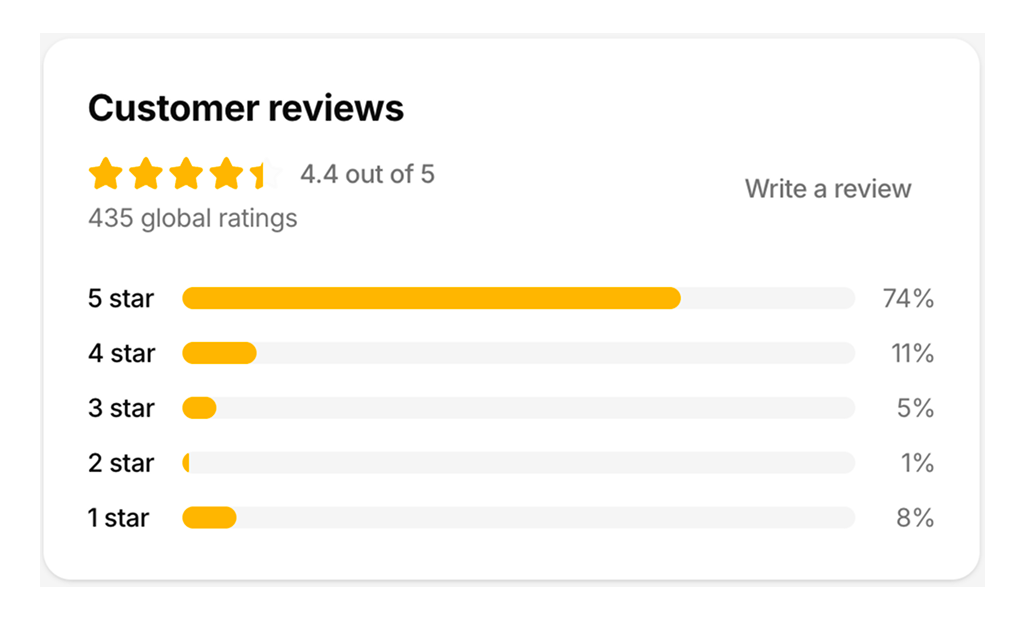
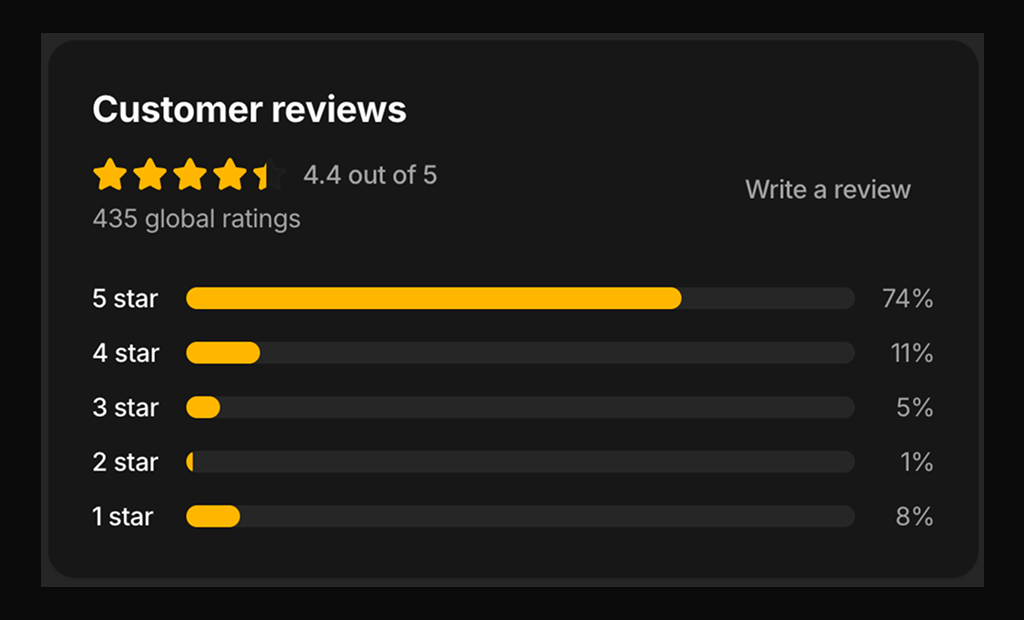
Compact card showing a 4.4 average with partially filled stars, the global rating count, a Write a review button and five per-star progress bars with percentages.

Customer Reviews 3 Pro

Review list with average score, product thumbnails, Sort by select, review entries with thumbs up and down counts, more menus, pagination and a Write a Review dialog with star picker and form fields.

Customer Reviews 4 Pro

Review list with live search, Date Posted and Rating filter dropdowns, titled review entries, an empty state and pagination, next to a 4.3 rating summary with labelled count bars.

Customer Reviews 5 Pro

Single review card with author avatar, more menu, star rating, title, body, date, Verified Purchase label, three photo thumbnails and Helpful and Unhelpful vote buttons with live counts.

Customer Reviews 6 Pro

Seller-side reviews view with total reviews and growth badge, average rating and star distribution bars, followed by reviews showing buyer spend, review count, Public Comment, Direct Message and a like toggle.

Customer Reviews 7 Pro

Customer Stories carousel on a muted background with heading, previous and next arrows and review cards showing avatar, name, Verified Customer role, star rating and text, one to three per view.

Customer Reviews 9 Pro

Review summary with recommendation rate and rating bars, an eight photo customer grid that opens a full-screen lightbox carousel, and a comment carousel with custom arrows and star ratings.

Customer Reviews 8 Pro

Muted sidebar with a 4.50 score, star percentage bars and What Customers Like vote badges, beside a review list with avatars, dates, stars, Reply and Share buttons and a thumbs up toggle.

About Shadcn UI Customer Reviews Blocks

A customer reviews section collects ratings and written feedback from people who already bought, and shows them where new shoppers make their decision. These nine shadcn blocks cover the full range: a single review card, a compact rating summary, review lists with search and pagination, a seller dashboard and carousels with customer photos.

Like the rest of our shadcn blocks, every layout is written in React and TypeScript and styled with Tailwind CSS on top of shadcn ui components such as Button, Dialog, DropdownMenu, Select, Pagination and Carousel. Ratings, counts and reviews live in plain arrays at the top of each file, so you can connect the shadcn components to your own review data without touching the layout.

Key Elements of a Customer Reviews Section

  • Average rating: a large score with stars and the number of reviews behind it, such as 4.5 based on 146 reviews.
  • Rating breakdown: one bar per star level, so shoppers see whether the average hides many one star reviews.
  • Individual reviews: name, avatar, star rating, date and the review text, with a title where it helps scanning.
  • Trust signals: a Verified Purchase label and photos taken by customers.
  • Navigation and feedback: sorting, search, rating filters, pagination and helpful votes for long lists.
  • A way to contribute: a Write a Review button that opens a short form.

Where and Why to Use Customer Reviews Blocks

Product copy tells shoppers what you promise. Reviews tell them whether the promise held up for someone like them. A visible score and a few honest opinions reduce returns, answer questions about fit and quality, and give hesitant visitors a reason to add the item to the cart. Because these are shadcn ui components, the review section picks up the same theme tokens as your product page and checkout.

  • Product detail pages: a full list with a rating summary, sorting and pagination below the purchase area.
  • Near the price: a compact rating summary card that shows the score and breakdown at a glance.
  • Home and landing pages: a carousel or a short testimonial style section that highlights a few strong reviews.
  • Furniture, fashion and home stores: photo grids where buyers show the product in real rooms or outfits.
  • Seller and admin dashboards: review stats with reply and message actions for the support team.
  • Marketplaces: per review vote counts so the most useful opinions rise to the top.

Customer Reviews Blocks in This Collection

  • Customer Reviews 1: Suited to a brand homepage or wellness store where a few warm quotes matter more than numbers. The alternating speech bubble layout reads like a conversation next to your headline.
  • Customer Reviews 2: Use it beside the buy box or at the top of a reviews tab when you only need the score and how ratings are spread.
  • Customer Reviews 3: A complete review page for fashion or general retail, including the form for submitting a new review in a dialog.
  • Customer Reviews 4: The best pick for products with thousands of reviews, since shoppers can search the text and narrow the list to one star level.
  • Customer Reviews 5: A building block for your own review list. Render it once per review when you want photos and helpful votes on every entry.
  • Customer Reviews 6: Built for the seller side rather than the storefront, with buyer spend history and buttons for answering each review.
  • Customer Reviews 7: A full width band for landing pages that lets visitors browse customer stories with arrow buttons or a swipe.
  • Customer Reviews 8: Fits courses, venues or services where you also want to show which qualities customers voted for, next to the reviews themselves.
  • Customer Reviews 9: Made for visual products such as furniture, where customer photos in a lightbox carry as much weight as the written comments.

Similar Block Categories

  • Product Details: the product page that a review list usually sits under.
  • Testimonials: curated quotes for marketing pages when you do not need ratings or counts.
  • Product Cards: show the star rating on the card before shoppers open the product.
  • Stats: highlight totals such as happy customers or average score on a landing page.
  • FAQs: answer the questions that keep coming up in reviews.

Accessibility

Avatars and photos have alt text with the reviewer name or a numbered customer photo label, and Customer Reviews 1 labels its star row as “5 out of 5 stars”. The Write a Review form in Customer Reviews 3 connects its title, review and name fields to visible labels, and the search field in Customer Reviews 4 uses an InputGroup. The interactive parts built on Dialog, DropdownMenu, Select, Pagination and Carousel get keyboard support and focus handling from the shadcn components, and the photo buttons in Customer Reviews 9 show a focus ring. The arrows in Customer Reviews 7 and in the Customer Reviews 9 lightbox come from the Carousel and include screen reader text such as “Previous slide”.

Several controls are icon only, such as the more menu buttons, the heart in Customer Reviews 6 and the comment arrows in Customer Reviews 9, so consider adding an aria-label to each. The star rating buttons in the review form would also benefit from labels like “Rate 4 stars”, and the other star rows from a text alternative for the rating. The lightbox dialog in Customer Reviews 9 should get a visually hidden DialogTitle.
Customer Reviews FAQ

A customer reviews section shows what buyers say about a product or store: star ratings, written feedback, names and often photos. It gives new shoppers evidence from people who already bought, right where they decide whether to buy.

They are ready-made review sections built with shadcn ui components and Tailwind CSS. The nine blocks range from a single review card and a rating summary to full review lists with search, sorting, pagination, photo lightboxes and carousels.

Shoppers cannot touch the product, so they rely on other buyers. An average score, the number of reviews and a few detailed opinions answer questions about fit, quality and delivery that product copy cannot answer credibly on its own.

An average rating with the total count, a breakdown per star level, and individual reviews with a name, rating, date and text. Sorting or filtering, customer photos, helpful votes and a Write a Review action make a long list useful.

Below the main purchase area on product detail pages, as a compact summary near the price, on category or landing pages as a carousel of highlights, and in seller or admin dashboards where the team reads and answers feedback.

Customer Reviews 3. Its Write a Review button opens a Dialog with a clickable five star rating, a title input, a review textarea and a name input. Submit Review stays disabled until a star rating is chosen, and the rating shows a word such as Good or Excellent.

Customer Reviews 4. A search field filters the list by reviewer name and review text as you type, and a Rating dropdown narrows the list to one star level. When nothing matches, the block shows a “No reviews found.” message.

Not yet. In Customer Reviews 3 and Customer Reviews 4 the sort controls and page buttons only update local state, so the same sample reviews stay on screen. Connect the selected sort value and page number to your API or server query to load the matching reviews.

Customer Reviews 2, Customer Reviews 3, Customer Reviews 4 and Customer Reviews 8 draw each star twice: an empty star and a filled amber star on top, clipped to a width between 0 and 100 percent. A rating of 4.4 fills four stars and 40 percent of the fifth. The other blocks fill whole stars only.

Customer Reviews 9 shows eight customer photos in a four column grid with a +6 overlay on the last one, and every photo opens a full screen lightbox carousel. Customer Reviews 5 adds three photo thumbnails to a single review, and Customer Reviews 3 shows product thumbnails next to the average score.

Customer Reviews 5 keeps a Helpful and an Unhelpful counter. A shopper can vote once, and switching sides moves the vote from one counter to the other. Customer Reviews 8 toggles a thumbs up count per review, and Customer Reviews 6 toggles a heart icon. All of them keep the state in React only, so save votes through your own API.

Customer Reviews 7 and Customer Reviews 9 use the shadcn Carousel, which is built on Embla. Customer Reviews 7 shows one card on phones, two from the small breakpoint and three on large screens, with arrows in the header. Customer Reviews 9 uses the same widths for its comment cards and disables its arrows at either end.

Each block keeps its content in arrays and constants at the top of the file: a reviews array with name, avatar, rating, date and text, plus values such as AVERAGE and TOTAL and a ratings or breakdown array for the bars. Map your API response to the same fields and the layout stays unchanged.

Customer Reviews 6. It opens with three stats (total reviews with a growth badge, average rating, and a distribution of star counts) and lists each review with the buyer's total spend and review count plus Public Comment and Direct Message buttons for replying.

No. All nine customer reviews blocks are part of All Access, the one-time license that also unlocks every other block, admin dashboard and template with lifetime updates.

The two column layouts in Customer Reviews 1, Customer Reviews 3, Customer Reviews 4, Customer Reviews 8 and Customer Reviews 9 stack into one column below the large or medium breakpoint, and Customer Reviews 4 moves its rating summary above the list. In Customer Reviews 6 the reviewer column keeps a fixed width, so test it on narrow screens.
shadcn customer reviews sections
Unlock Premium Blocks & Sections
Premium blocks are part of All Access. One license unlocks the whole Shadcn UI Kit, so you can build complete pages and products instead of single sections.
  • 550+ blocks for landing pages, stores, dashboards and apps
  • 16 admin dashboards and 17 ready-made apps
  • 5 premium Next.js website templates
  • 560+ component variants and 70+ examples
  • Install with the shadcn CLI or from your AI editor through the MCP server
  • Lifetime updates, including every new block we release
Unlock Now

One-time payment, no subscription.