Shadcn CTA Sections

High-converting call-to-action sections built with shadcn/ui button and card components. These strategically designed CTA components drive user actions, boost conversions, and guide visitors through your sales funnel with compelling copy, eye-catching designs, and strategic placement. Perfect for driving sign-ups, purchases, and engagement.

CTA Section 1 Pro

Single row CTA with a headline and short contact line on the left and a Get Started button with arrow icon on the right, over a radial gradient background.

CTA Section 2 Pro

Centered CTA with headline, one line of text, a Get Started button and a Learn more link button, over a dashed grid pattern that fades out toward the bottom.

CTA Section 3 Pro

Bordered card split into two columns: headline, paragraph, Start Free Trial and Learn More buttons on one side and a wide image on the other, stacking image first on mobile.

CTA Section 4 Pro

Two column CTA without a background: a large headline on the left and a paragraph with Start Free Trial and outline Learn More buttons on the right.

CTA Section 5 Pro

Muted card with a course headline, paragraph and Start Learning button, plus a learner count line and five overlapping avatars, placed next to a square photo of students.

CTA Section 6 Pro

Centered headline, subtext and Get in touch button above a full width row of seven portrait images with alternating widths and vertical offsets.

CTA Section 7 Pro

Muted rounded panel with headline, paragraph, Start Free Trial and Schedule a Demo buttons on the left and a product image aligned to the bottom right.

CTA Section 8 Pro

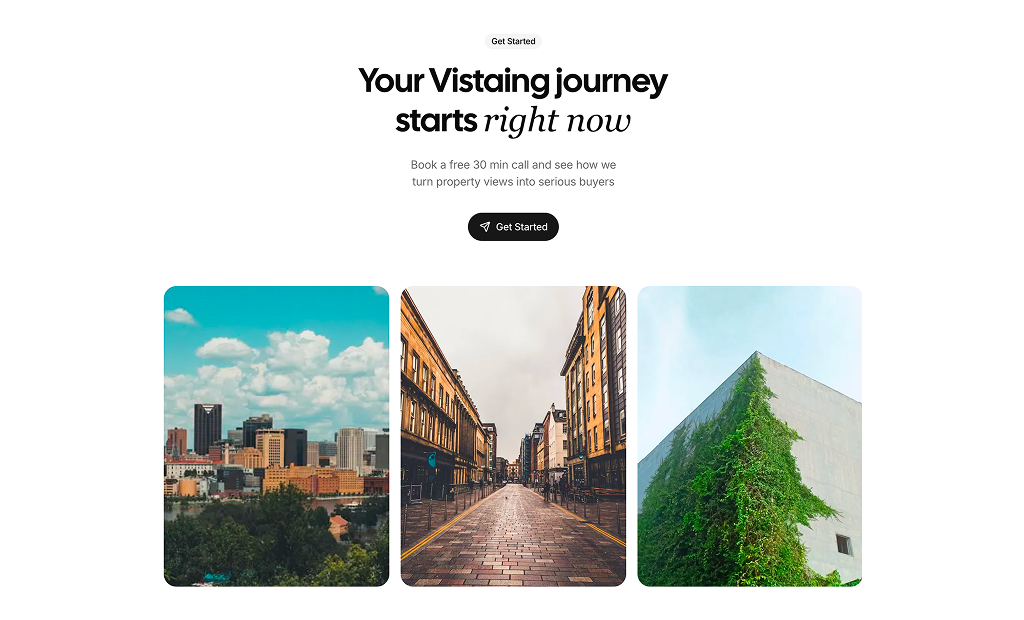
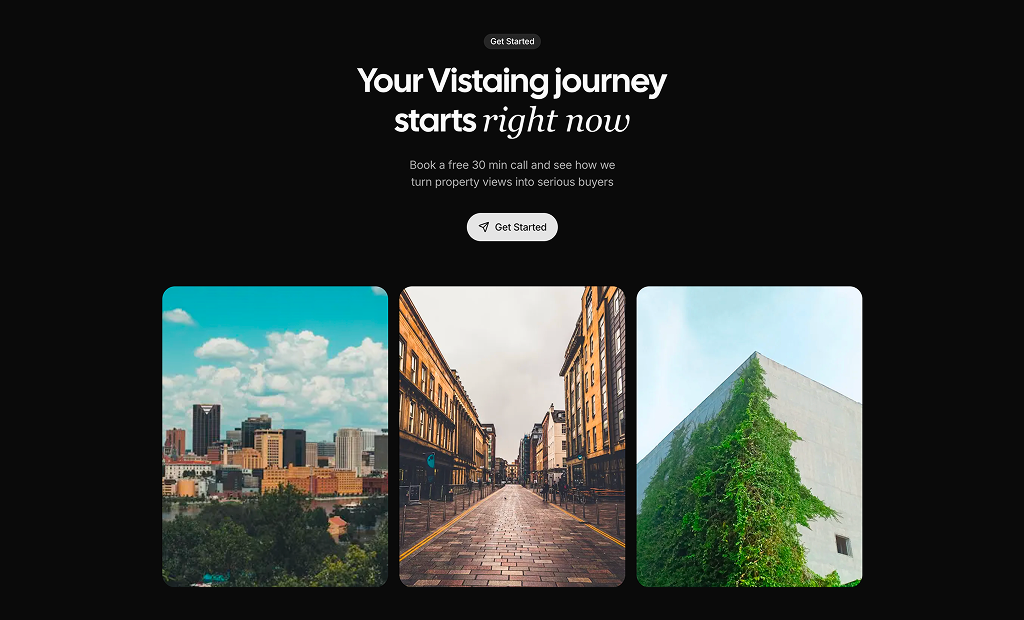
Centered Get Started badge, headline with an italic serif accent, subtext and rounded Get Started button with send icon, followed by three tall property photos in a grid.

CTA Section 9 Pro

Rounded banner with a background photo, a discount headline and subtext in dark text, and Get Started and secondary Contact buttons below.

CTA Section 10 Pro

Contact CTA with an outline badge, headline, mailto link and three columns for email support, office address and phone, each with a round icon.

CTA Section 11 Pro

Two column agency CTA: headline with an inline avatar group, paragraph and Book a Call button on the left, two linked service cards with arrow icons on the right.

CTA Section 12 Pro

Integrations CTA with brand logos placed on concentric half rings that fade out, a centered headline, supporting text and an Explore integrations button.

About Shadcn UI Call to Action Blocks

A CTA section is a focused block that asks visitors to take one clear step, such as starting a trial, booking a call or getting in touch. These eleven shadcn CTA blocks range from a single line with a button to image grids, background photos, contact columns and an agency layout with service cards.

Like the rest of our shadcn blocks, each section is written in React and TypeScript, styled with Tailwind CSS and built from shadcn ui components such as Button, Card, Badge and Avatar. They read the colors from your theme, stack cleanly on small screens and work as drop-in shadcn components for landing pages, product sites and portfolios.

Key Elements of a CTA Section

  • Benefit headline: a short line such as β€œReady to transform your business?” that tells visitors what they gain.
  • Supporting sentence: one line that removes a doubt, for example a free trial or a free 30 minute call.
  • Primary button: a specific label like Start Free Trial, Book a Call or Get in touch, styled as the strongest element.
  • Secondary action: a softer option such as Learn More or Schedule a Demo for visitors who are not ready to commit.
  • Visual support: an image, background pattern or avatar group that adds context or trust without hiding the button.

Where and Why to Use CTA Blocks

A visitor who has just read your features or a testimonial is at the point where they decide to act or leave. A CTA block puts the next step right there, so they do not have to scroll back to the hero. Repeating the same action at a few points on a long page also raises conversion without adding new copy. Since the blocks are built with shadcn ui and Tailwind CSS, they match the buttons and cards used elsewhere on your site.

  • SaaS landing pages: close the page with a trial or sign up offer after features and pricing.
  • Agency and freelance sites: invite visitors to book a call and show the services you offer.
  • Online courses: pair a Start Learning button with learner avatars and a student count.
  • Real estate and travel: let property or destination photos do the selling around a booking button.
  • Contact sections: list email, office and phone details when a direct conversation is the goal.
  • Promotions: highlight a discount or limited offer on a background image with a clear Get Started button.

CTA Blocks in This Collection

  • CTA Section 1: A one line closer for the bottom of a page, where a soft gradient adds color without competing with the button.
  • CTA Section 2: Use it when you want a centered message with a primary action and a lighter text link, framed by a subtle dashed grid.
  • CTA Section 3: Fits product sites that want to show a screenshot or photo beside the trial offer inside one bordered card.
  • CTA Section 4: A plain, text only option for pages that already have enough visuals and only need the offer restated.
  • CTA Section 5: Built for course and community products, where showing how many people already joined helps the sign up.
  • CTA Section 6: Suits studios and portfolios that want a band of project images to carry the invitation to get in touch.
  • CTA Section 7: Good for SaaS pages that offer both a trial and a demo, with a product image anchored to the bottom corner of a muted panel.
  • CTA Section 8: A photo led section for real estate or hospitality, with an italic serif accent that gives the headline more character.
  • CTA Section 9: Works best for a time limited offer or discount that needs to stand out as a colorful banner.
  • CTA Section 10: Choose it when the action is to reach a person directly, by email, phone or office visit, rather than to click a button.
  • CTA Section 11: Made for agencies and consultants who want to put faces next to the booking button and point to their service pages.

Similar Block Categories

  • Hero Sections: open the page with the same action your CTA repeats at the end.
  • Newsletter Sections: collect an email address when a sign up is too big a step.
  • Pricing Tables: show the plans right before the final call to action.
  • Contact Us: give visitors a full form when a call or email is the next step.
  • Testimonials: place customer quotes before the CTA to build trust.

Accessibility

Buttons are shadcn Button components rendered as links through asChild, so they are reachable with the keyboard and show the default focus ring. Headlines use h2 or h3 elements, and the images in CTA Section 5, 6, 7 and 8 carry descriptive alt text. CTA Section 3 still has a placeholder alt of β€œ...”, so replace it with a real description, or an empty alt if the image is decorative. The avatar images in CTA Section 5 and 11 have alt text and initials as a fallback.

Check contrast when you change backgrounds: CTA Section 9 uses black text on a photo and CTA Section 1 places text over a gradient. Button labels such as Learn More are generic, so consider adding an aria-label that names the target page when several similar links appear on the same page.

CTA Sections FAQ

A CTA (call to action) section is a short block that asks visitors to take one specific step, such as starting a trial, booking a call or getting in touch. It combines a headline, a line of supporting text and one or two buttons, and it usually sits between longer sections or right before the footer.

They are ready-made call to action sections built with shadcn ui components such as Button, Card, Badge and Avatar and styled with Tailwind CSS. You add a block to your page, rewrite the headline and point the buttons to your sign up, demo or contact page.

Visitors who have read your features or pricing need a clear next step, otherwise many of them leave. A CTA section repeats the main action at the moment interest is highest and removes the need to scroll back to the top to find the button.

A headline that states the benefit, one sentence of supporting text and a primary button with a specific label like Start Free Trial or Book a Call. A secondary action such as Learn More or Schedule a Demo is useful for visitors who are not ready yet. Social proof, like the learner avatars in CTA Section 5, can add trust next to the button.

Place it after a section that builds interest, such as features, testimonials or pricing, and once more right above the footer. On long landing pages one CTA every few sections works well, as long as each one repeats the same main action.

Most blocks wrap their buttons in a Next.js Link with Button asChild and href set to #, so you only change the href. CTA Section 4, CTA Section 7, CTA Section 8 and CTA Section 9 render plain Button elements without a link, so wrap them in a Link with asChild or add an onClick handler before you ship.

CTA Section 1 uses a radial gradient that fades from the page background into a purple tone at the bottom. CTA Section 2 draws a dashed grid with CSS mask images that fades out toward the bottom and drops to 15% opacity in dark mode. CTA Section 9 places the content on a full background photo inside a rounded box.

CTA Section 3 and CTA Section 7 split a card into copy and a wide image. CTA Section 5 puts a square photo next to a muted card. CTA Section 6 runs a row of seven staggered portrait images under the text, and CTA Section 8 shows three tall photos in a grid below the button.

The images use next/image with Unsplash URLs. Swap the src values for your own files or add your image host to images.remotePatterns in next.config. CTA Section 6 and CTA Section 5 keep their images in arrays at the top of the component, and CTA Section 9 sets its photo as a an arbitrary Tailwind background image class on the wrapper.

CTA Section 11. Its headline places a group of expert avatars inline with the text, a Book a Call button sits below, and two linked service cards for Design and Development sit on the right. The services and experts are plain arrays you can extend.

Yes, CTA Section 10. It shows a Reach Out To Us badge, a headline with a mailto link and three columns for email, office address and phone, each with an icon. It has no buttons, so it fits contact pages or the end of a services page.

CTA Section 4 and CTA Section 1. CTA Section 4 is a two column layout with the headline on the left and text plus two buttons on the right, with no card or background. CTA Section 1 is a single row with the headline on one side and a Get Started button on the other.

The split layouts use lg:grid-cols-2 or lg:flex-row, so they stack into one centered column below the large breakpoint. In CTA Section 3 the image moves above the text on small screens. CTA Section 6 narrows its portrait images to w-32 and clips the overflow, and CTA Section 8 drops from three images per row to one.

No. They only import shadcn ui components (Button, Card, Badge, Avatar), lucide-react icons and the Next.js Link and Image components. There is no animation library or form library involved.

Its headline and text use fixed black colors because they sit on a light background photo. If you change the photo in CTA Section 9 to a darker one, switch text-black and text-black/60 to colors that keep enough contrast on the new image.
No. All eleven CTA blocks are part of All Access, the one-time license that also unlocks every other block, admin dashboard and template with lifetime updates.
shadcn cta sections
Unlock Premium Blocks & Sections
Premium blocks are part of All Access. One license unlocks the whole Shadcn UI Kit, so you can build complete pages and products instead of single sections.
  • 550+ blocks for landing pages, stores, dashboards and apps
  • 16 admin dashboards and 17 ready-made apps
  • 5 premium Next.js website templates
  • 560+ component variants and 70+ examples
  • Install with the shadcn CLI or from your AI editor through the MCP server
  • Lifetime updates, including every new block we release
Unlock Now

One-time payment, no subscription.