Shadcn Stats Sections

Animated stats section components built with shadcn/ui to showcase key metrics, social proof numbers, and performance indicators. These blocks use scroll-triggered counter animations powered by the Intersection Observer API to present your most compelling numbers in a visually engaging format. Perfect for SaaS landing pages, product sites, and marketing pages.

Stats 1 Pro

Left aligned label, heading and intro above four counters in a row with dividers on desktop, each with a large count up number, colored suffix, bold label and one line description.

Stats 2 Pro

Muted section with a centered Stats badge and a heading with a primary accent word, above three cards that each show a count up number and a short label.

Stats 3 Pro

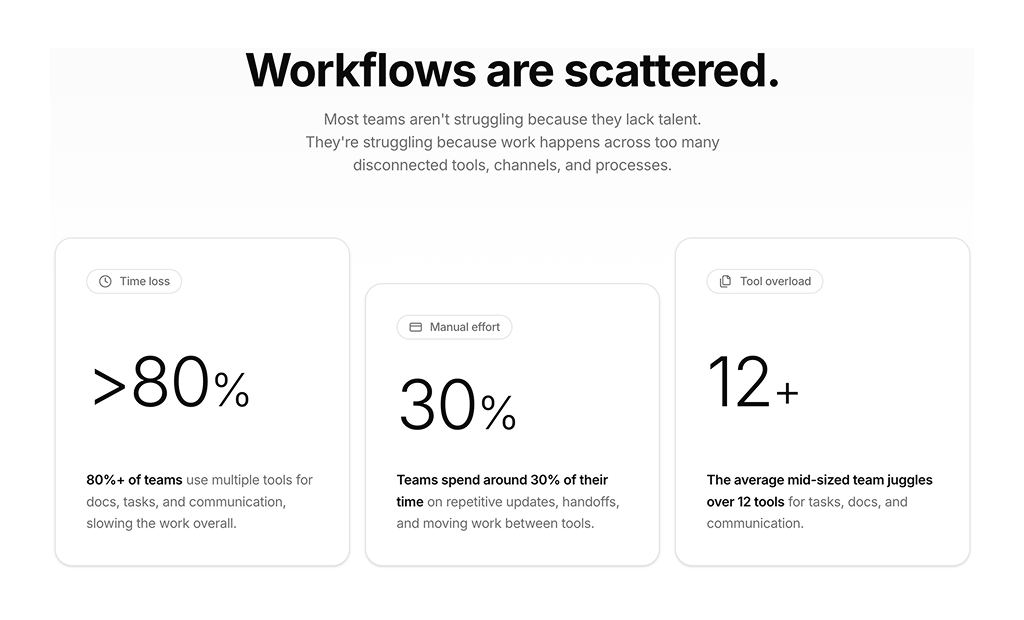
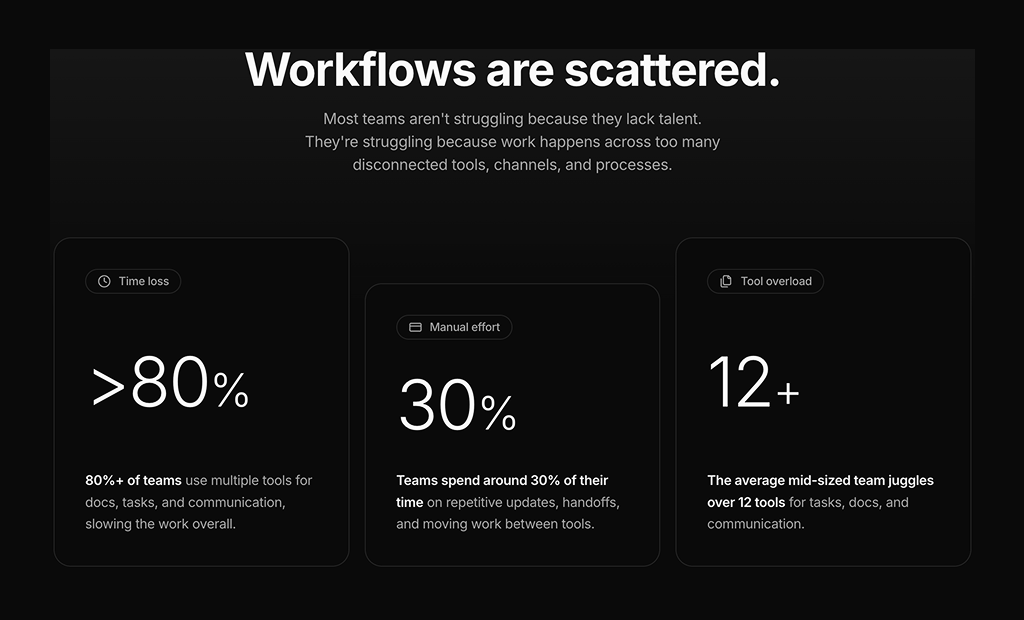
Centered problem statement heading and text above three cards with an icon badge, a large light count up percentage and a sentence with bold lead text. The middle card is offset lower.

Stats 4 Pro

Three columns: a heading with four stats in a two by two grid (three count up, one static 24/7), a tall photo in the middle and two paragraphs with a rounded About Us button.

Stats 5 Pro

Why Us badge, heading and text with three decimal count up stats on the left, and a two by two grid of muted tiles with a primary icon, title and short description on the right.

Stats 6 Pro

Muted section with a small label, heading, text and three stats (two count up, one static rating) on the left and two bordered feature cards with primary icons on the right.

Stats 7 Pro

Two line heading with an italic tagline aligned right, above a two by two grid of accent cards with corner bracket borders, a label and a large primary count up number.

Stats 8 Pro

Two column layout with a rounded dashboard screenshot on one side and a badge, large heading, text and two faded count up numbers with labels on the other.

Stats 9 Pro

Results label and heading above a bordered card split in two: two count up stats with a recharts bar chart of monthly tasks, and a subheading, text and a large 99.9% stat.

Stats 10 Pro

Accent colored bordered panel with a long heading and About Us button on the left and three divided rows on the right, each with a large count up number, label and description.

Stats 11 Pro

Primary colored rounded band with four stats in a row separated by thin dividers, starting with a static #1 and followed by count up numbers with labels. Stacks on phones.

Stats 12 Pro

Indicator label and heading with a reviewer avatar, 4.9/5 score, five stars and review source on the left, and a bordered two by two grid of centered count up stats on the right.

About Shadcn UI Stats Blocks

A stats section presents a handful of key numbers, such as users, ratings, uptime or results, to prove a claim at a glance. These twelve shadcn stats blocks range from simple number rows and stat cards to layouts that pair numbers with images, feature lists, a review rating or a bar chart.

Like the rest of our shadcn blocks, every layout is built with React, TypeScript and Tailwind CSS on top of shadcn ui components such as Card, Badge, Button, Avatar and Chart. All numbers count up once when they scroll into view, using a small hook with no animation library, and these shadcn components follow your light and dark theme.

Key Elements of a Stats Section

  • Three or four numbers: enough to build a picture, few enough to remember.
  • Clear units: suffixes like K+, %, M+ or /5 so each value reads correctly at a glance.
  • Specific labels: “Active users this month” says more than “Users”.
  • Context: a heading or short description that tells visitors what the numbers prove.
  • Visual weight: large, tabular figures that stand out from the surrounding copy.

Where and Why to Use Stats Blocks

Visitors skim, and numbers are what they catch first. A stats block turns marketing claims into evidence and gives the page a strong visual rhythm between longer sections. Since these blocks use shadcn ui components and Tailwind CSS tokens like primary, muted and accent, they fit next to your hero, feature and testimonial sections without extra styling.

  • SaaS homepages: back up the hero with users, uptime or integrations.
  • Agency and studio sites: show years in business, projects delivered and client success.
  • Fintech and CRM products: highlight transactions, customers or deals closed.
  • Problem statements: use numbers to describe the pain your product solves before you pitch it.
  • About pages: summarize company scale and reach in one short band.

Stats Blocks in This Collection

  • Stats 1: A versatile default for SaaS pages that want each number explained by a sentence of context.
  • Stats 2: Three simple cards for engagement metrics, useful when the numbers should feel like product data.
  • Stats 3: Built to describe a problem rather than brag, with each figure tagged as a pain point in a staggered row.
  • Stats 4: Combines numbers, a photo and an About Us story, a good fit for consumer apps that want a human touch.
  • Stats 5: Supports a “why us” pitch, where download and rating figures sit beside four benefit tiles.
  • Stats 6: A muted band for B2B tools that want two larger feature highlights backed by review numbers.
  • Stats 7: Suits agencies and dev studios, with a bold slogan and four numbers framed by corner brackets.
  • Stats 8: Use it to promote one product feature, with a screenshot and two subtle headline figures.
  • Stats 9: The most data heavy option, showing a growth trend alongside the headline results.
  • Stats 10: A boxed layout that lets a strong statement and three explained results carry a closing argument.
  • Stats 11: A high contrast strip for market leadership claims that needs no heading of its own.
  • Stats 12: Adds third party review credibility next to business results, ideal for agencies and consultancies.

Similar Block Categories

  • Stat Cards: dashboard KPI cards for showing live numbers inside an app.
  • Testimonials: pair numbers with customer quotes for stronger social proof.
  • Feature Sections: explain the features that produce the results you show.
  • Charts: full chart components when one bar chart is not enough.
  • Hero Sections: the headline that your stats section should back up.

Accessibility

The numbers are plain text, so screen readers read the final values once the count finishes. While a count is running, the text changes many times per second. None of the blocks check for reduced motion, so consider skipping the animation and rendering the final value when the visitor prefers reduced motion. The bar chart in Stats 9 has no text alternative, so the trend it shows could also be summarized in a sentence.

Stats 8 renders its numbers at 30% opacity, which can fall below comfortable contrast in some themes, so check the result against your colors. The images in Stats 4 have no alt text, while Stats 8 and the reviewer avatar in Stats 12 include one.

Stats FAQ

A stats section highlights a few key numbers about a product or company, such as active users, uptime, ratings or projects delivered. Each number has a short label, and the section works as quick, concrete proof between longer blocks of copy.

They are ready-made number sections built with React, Tailwind CSS and shadcn ui components such as Card, Badge, Button, Avatar and Chart. Every block counts its numbers up when it scrolls into view, and the values live in a stats array at the top of the file.

Numbers are easy to scan and harder to dismiss than adjectives. A claim like “trusted by teams worldwide” becomes believable when it sits next to a user count, a rating or a retention rate, which makes stats one of the simplest forms of social proof.

Pick three or four numbers that a buyer cares about and that you can back up, such as active users, uptime, number of integrations or satisfaction rating. Round numbers with a clear label are easier to remember than precise figures.

Right after the hero to back up the headline, between feature sections to break up text, or on an About page to show company scale. Keep it close to the claim the numbers support.

Each block has a small useCountUp hook. An IntersectionObserver starts the count when about 30% of the number is visible, requestAnimationFrame updates it with an ease out curve over 1.6 to 1.8 seconds, and the observer disconnects so the count runs only once. No animation library is needed.

Edit the stats array. Each entry has a value, a suffix such as K+, % or M+ and a label, and some blocks add a description. Set decimal to true for values like 4.9, as in Stats 1, Stats 5 and Stats 12, so the counter keeps one decimal place.

Yes. Stats 4, Stats 6 and Stats 11 support static entries with isStatic set to true and a display string, which is how they show values like 24/7, 4.9/5 or #1 without animating them.

Stats 9. It shows a bar chart of monthly automated tasks next to two counters, built with the shadcn ChartContainer and recharts. Edit the chartData array to plot your own monthly values.
Stats 5 pairs three counters with a two by two grid of feature tiles, and Stats 6 places three numbers next to two larger feature cards. Both suit “why choose us” sections where the numbers support a list of benefits.

Stats 12. Next to four counters it shows a reviewer avatar, a 4.9/5 score with five stars and a line about the review source. Replace the avatar, score and source text with your own rating platform.

Stats 11. Four stats sit in a single row on a primary colored panel, divided by thin lines, and they stack vertically on phones. It works well between two light sections as a visual break.

The multi column layouts stack into a single column, while compact groups such as the four cards in Stats 7 and the counters in Stats 12 stay in two columns. Stats 1 also centers its numbers on small screens and aligns them left from the large breakpoint.

No. All twelve stats blocks are part of All Access, the one-time license that also unlocks every other block, admin dashboard and template with lifetime updates.
shadcn stats sections
Unlock Premium Blocks & Sections
Premium blocks are part of All Access. One license unlocks the whole Shadcn UI Kit, so you can build complete pages and products instead of single sections.
  • 550+ blocks for landing pages, stores, dashboards and apps
  • 16 admin dashboards and 17 ready-made apps
  • 5 premium Next.js website templates
  • 560+ component variants and 70+ examples
  • Install with the shadcn CLI or from your AI editor through the MCP server
  • Lifetime updates, including every new block we release
Unlock Now

One-time payment, no subscription.