Shadcn Product Details Sections

Complete product detail page components built with shadcn/ui featuring image galleries, detailed specifications, customer reviews, and purchase options. These professional product page components are designed for high-converting ecommerce experiences that showcase all product information effectively and drive sales with strategic design and layout.

Product Detail 1 Pro

Two column product page with a large photo on the left and the title, price, five star rating, reviews link, Add to Cart and wishlist buttons, description paragraph and Key Features list on the right.

Product Detail 2 Pro

Apparel product page with a four photo collage, name, price, star rating with reviews link, color and size radio pickers with an out of stock size, Add to Cart button, description and highlights list.

Product Detail 3 Pro

T-shirt product page with breadcrumb, main image and clickable thumbnails, price, rating, description, size Select, color buttons, quantity stepper, Add To Cart and Buy Now buttons and collapsible Details, Shipping and Returns rows.

Product Detail 4 Pro

Perfume product page with a main image carousel synced to a thumbnail strip, category badge, name, price, intro, volume buttons, Add to Bag and Buy Now buttons and collapsible characteristics, description, delivery and returns.

Product Detail 5 Pro

Fragrance product page with breadcrumb, title, rating, description, delivery and gift wrap notes, price, color swatches, Add to cart and Buy now buttons, a notes and volume table and a looping image carousel below.

Product Detail 6 Pro

Serum product page with an image carousel and dots, rating, price, volume, quantity stepper, save, wishlist and Buy product buttons, then tabs for ingredient accordion, rating summary with review carousel, benefits and usage.

Product Detail 7 Pro

Skincare product page with breadcrumb, image grid, rating, sale price with Save badge, bundle radio cards, quantity stepper, icon accordion sections, a You might also like carousel and Reviews and Q&A tabs with rating bars.

About Shadcn UI Product Details Blocks

A product details section is the heart of a product page: the gallery, name, price, rating, options and purchase buttons that turn a visitor into a buyer, plus the description and policies that answer their last questions. These seven shadcn product details blocks go from a short image and text split to full pages with synced carousels, bundle pricing, review summaries and recommendations.

Like the rest of our shadcn blocks, every layout is written in React and TypeScript with Tailwind CSS and assembled from shadcn ui components such as Carousel, RadioGroup, Select, Collapsible, Accordion, Tabs, Breadcrumb and InputGroup. The sample content covers apparel, perfume and skincare, and each block keeps its data in one object you can swap for your catalog. All layouts are responsive and follow your light and dark theme.

Key Elements of a Product Details Page

  • Image gallery: several photos with thumbnails, dots or arrows so shoppers can inspect the product from every angle.
  • Title, price and rating: the facts a shopper checks first, with a link to the reviews.
  • Variant selection: size, color, volume or bundle pickers that make the chosen option obvious.
  • Quantity and purchase actions: a quantity stepper, add to cart, buy now and wishlist buttons in one place.
  • Description and specifications: features, ingredients or notes in a list, table or collapsible sections.
  • Policies and reassurance: shipping, returns and payment information right next to the buy button.

Where and Why to Use Product Details Blocks

A product page has to carry a lot of information without feeling crowded, and getting the order and spacing right takes many design rounds. These blocks give you that structure up front: the purchase area stays above the fold, longer content folds into tabs or collapsible rows, and everything is built from shadcn components that match the rest of your shadcn ui store.

  • Apparel stores: size and color pickers with out of stock states fit clothing and multipacks.
  • Beauty and fragrance: volume options, notes, ingredients and how to use sections suit perfume and skincare.
  • Single product sites: one product details block can be the whole store for a brand that sells one hero item.
  • Promotions and bundles: show old and new prices and multi buy offers to raise the average order value.
  • Marketplaces: the breadcrumb, review summary and related products help shoppers move between listings.

Product Details Blocks in This Collection

  • Product Detail 1: The lightest layout. Use it when the product needs one strong photo and a short feature list rather than a full set of options.
  • Product Detail 2: Suits apparel and multipacks, where a photo collage up top and size availability matter most.
  • Product Detail 3: A classic store page with breadcrumb navigation, a quantity stepper and shipping and returns answers right under the buttons.
  • Product Detail 4: A calm luxury layout for perfume or cosmetics with a large swipeable gallery and details folded away until needed.
  • Product Detail 5: Puts the specification table next to the purchase area and moves the photos to a carousel below, a good fit when notes or specs drive the decision.
  • Product Detail 6: For products that need education, with separate tabs for details, reviews, benefits and usage under the buy box.
  • Product Detail 7: The most complete page, with multi buy offers, a recommendations row and a review summary, aimed at stores that want to raise order value.

Similar Block Categories

Accessibility

The interactive parts use shadcn components with built in keyboard support: RadioGroup in Product Detail 2 and 7, Select in Product Detail 3, Collapsible, Accordion and Tabs for the long content and Carousel with labelled previous and next buttons. Quantity steppers have aria-label values such as “Decrease quantity” and “Increase quantity”, the swatches in Product Detail 5 use the radiogroup role with aria-checked, and the bundle options in Product Detail 7 are wrapped in labels so the whole card is clickable.

Some details are worth adding when you adapt the blocks. Replace the placeholder “...” alt text in Product Detail 1 and 3 with real descriptions, give the heart button in Product Detail 1 and the image thumbnails in Product Detail 3 and 4 an aria-label, and consider aria-pressed on the color buttons in Product Detail 3 and the volume buttons in Product Detail 4 so the selected option is announced.

Product Details FAQ

A product details section is the main part of a product page. It combines the product photos with the name, price, rating, variant options and the purchase buttons, followed by the description, specifications and policies a shopper needs before buying.

They are complete product page layouts built with shadcn ui components and Tailwind CSS. The seven blocks range from a simple image and text split to full pages with galleries, bundles, review summaries and recommendations, ready to fill with your own product data.

It is where the buying decision happens. Shoppers arrive from ads, search and category grids, and the page has to answer their questions about price, fit, materials, shipping and returns. Missing information sends them back to the search results.

Several photos, the product name, price and rating, clear variant pickers for size or color, a quantity control, an add to cart button, a description with key features and short answers about shipping and returns. Reviews and related products help shoppers who are still undecided.

On the product route of your store, one page per product. The simpler layouts also work as a featured product section on a landing page or as the body of a single product store.

Product Detail 3 switches the main image from a row of thumbnails, which moves to a column beside the image on large screens. Product Detail 4 pairs a main carousel with a synced thumbnail carousel. Product Detail 6 uses a carousel with dot buttons, and Product Detail 7 shows a large image above a two by two grid.

Each block keeps the selected value in useState. Product Detail 2 uses the shadcn RadioGroup for colors and sizes and disables sizes marked inStock: false. Product Detail 3 combines a Select for size with buttons for color, Product Detail 4 has volume buttons, Product Detail 5 has color swatches and Product Detail 7 offers bundle options as radio cards.

Product Detail 6 has a Customer reviews tab with the average score, a star distribution drawn with Progress bars and a carousel of review cards, two per slide on medium screens. Product Detail 7 has a Reviews tab with a rating summary, a Write a review button and percentage bars per star level.

Use the collapsible sections. Product Detail 3 folds Details, Shipping and Returns into Collapsible rows, Product Detail 4 does the same for Characteristics, Description, Payment & Delivery and Returns, and Product Detail 7 uses an Accordion with an icon per section. Product Detail 5 lists its specifications in a two column Table instead.

The purchase buttons are plain shadcn Buttons without handlers, so add an onClick that sends the product id, the selected variant and the quantity to your cart store or API. Product Detail 3, Product Detail 6 and Product Detail 7 already keep the quantity in state. In Product Detail 2 the button sits inside a form, so handle the form submit or give the button type="button" to avoid a page reload.

The carousels in Product Detail 4, Product Detail 5, Product Detail 6 and Product Detail 7 use the shadcn Carousel, which depends on embla-carousel-react. Product Detail 7 also imports the Accordion primitive from the radix-ui package to build its custom trigger. Product Detail 1 and Product Detail 2 style their description with prose classes, which come from the @tailwindcss/typography plugin.
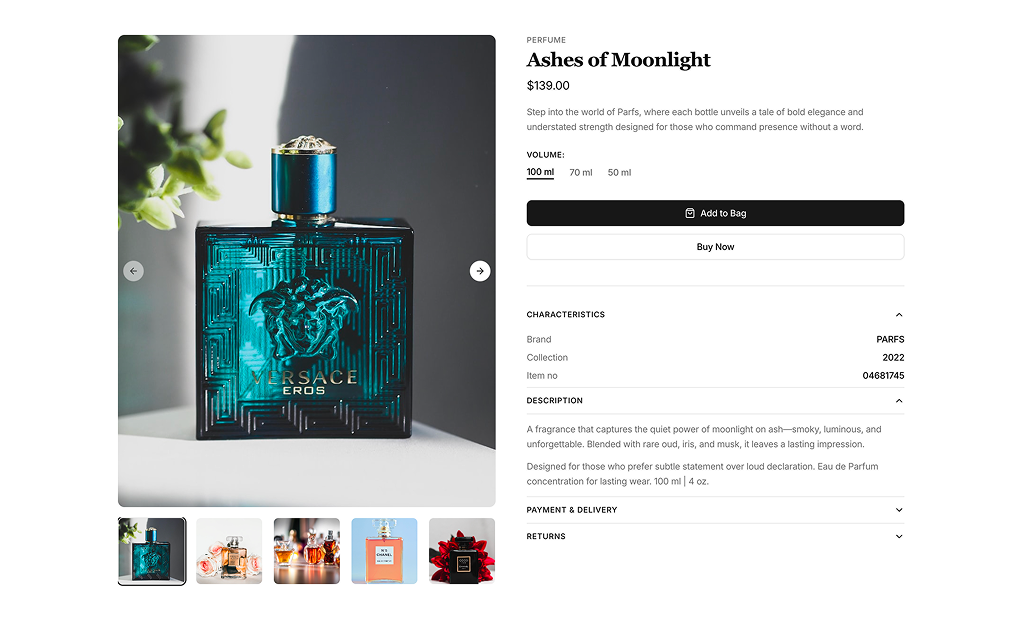
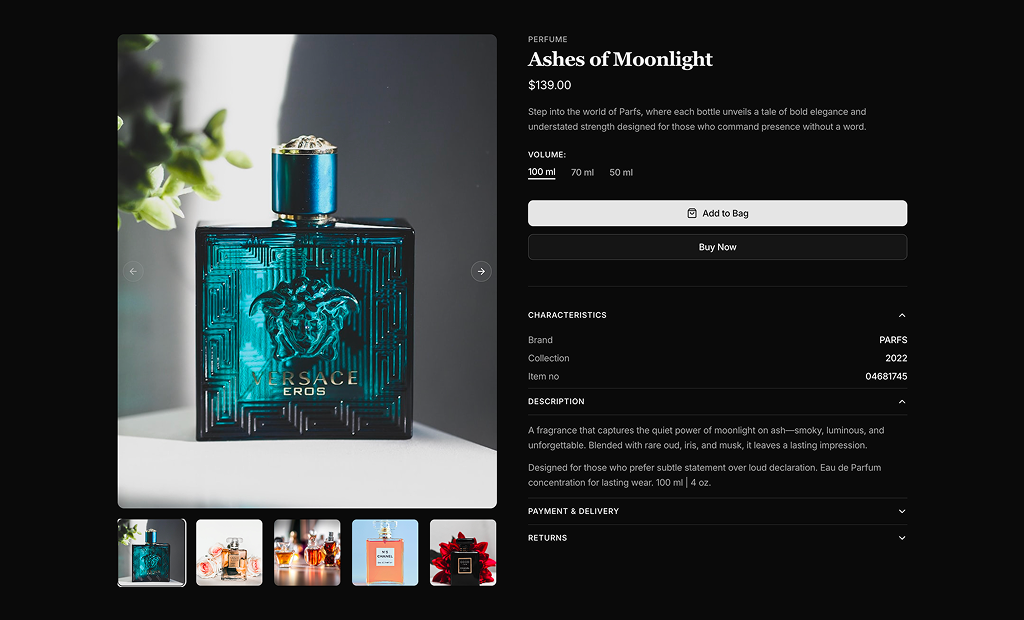
Product Detail 4 and Product Detail 5 are set up for perfume, with volume options, fragrance notes and long descriptions. Product Detail 6 and Product Detail 7 are set up for skincare, with ingredients, key benefits and how to use sections next to reviews.

Product Detail 7. It shows the current price next to the struck through old price with a Save badge calculated from both values, and offers Single Product, Buy 2 and Buy 3 options with their own prices and savings badges.

All blocks use a two column grid from the lg breakpoint and stack the gallery above the information on smaller screens. Product Detail 2 hides three of its four photos below lg and shows one, and the tab list in Product Detail 6 runs horizontally with scrolling on mobile and turns into a vertical menu on large screens.

No. All seven product details blocks are part of All Access, the one-time license that also unlocks every other block, admin dashboard and template with lifetime updates.
shadcn product details sections
Unlock Premium Blocks & Sections
Premium blocks are part of All Access. One license unlocks the whole Shadcn UI Kit, so you can build complete pages and products instead of single sections.
  • 550+ blocks for landing pages, stores, dashboards and apps
  • 16 admin dashboards and 17 ready-made apps
  • 5 premium Next.js website templates
  • 560+ component variants and 70+ examples
  • Install with the shadcn CLI or from your AI editor through the MCP server
  • Lifetime updates, including every new block we release
Unlock Now

One-time payment, no subscription.