Shadcn Dashboards Blocks

Complete shadcn dashboard page blocks built with Tailwind CSS and Recharts: admin, e-commerce, payments, hotel, projects, real estate, sales, HR, CRM, analytics, AI usage, file manager, crypto, academy, hospital, finance, logistics and SaaS content areas with KPI cards, charts and tables.

Dashboard 1 Free

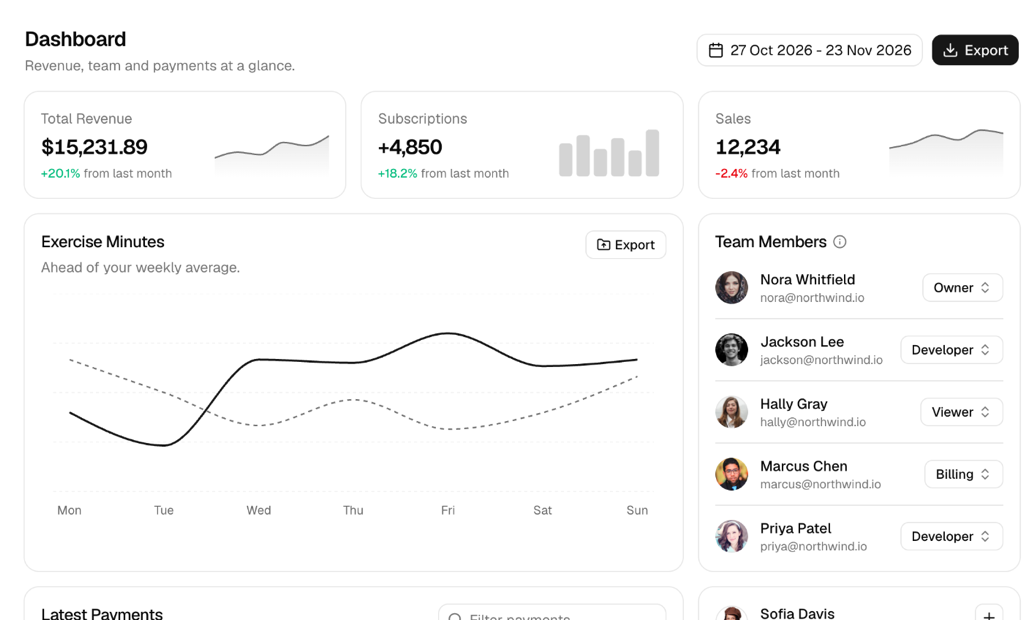
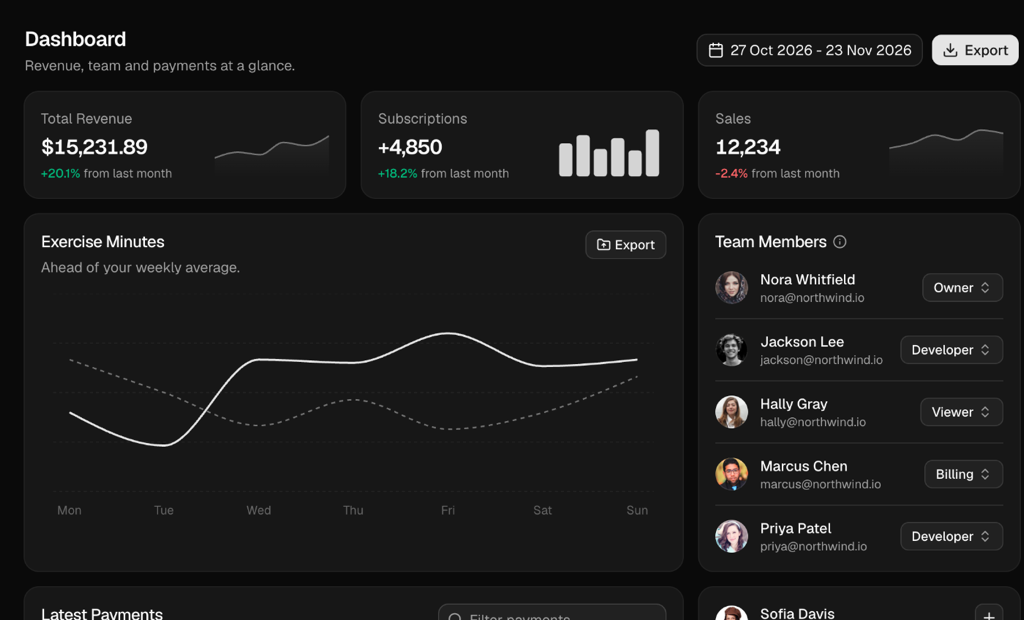
Admin overview with revenue, subscriptions and sales KPI cards with sparklines, an exercise minutes line chart, team members with role pickers, a latest payments table with search and pagination, and a support chat with a new message dialog.

Dashboard 2 Pro

Store dashboard with four KPI cards, revenue bar and returning rate area charts, sales by location progress list, visits by source donut, customer reviews breakdown, a recent orders table with search, sort and pagination, and a best selling products list.

Dashboard 3 Pro

Balances page with a dismissible verification alert, three currency balance cards, a transactions card with Latest and Upcoming tabs, and an exchange rate card with currency selects, a 7D, 30D and 90D toggle, a rate line chart and convert buttons.

Dashboard 4 Pro

Hotel dashboard with four stat cards, reservations donut, campaign overview line chart with range select, recent guest activities with a details dialog, stacked revenue bars with a period select, online and offline bookings split with D, W, M and Y tabs, and a booking list with search, status filter and bulk selection.

Dashboard 5 Pro

Project dashboard with four summary cards, projects overview area chart with range toggle, team highlights, a reminders list with an add reminder dialog, achievement by year bars, efficiency donut with month select, and a recent projects table with search, status filter and pagination.

Dashboard 6 Pro

Real estate dashboard with four KPI cards, a revenue and visits area chart with week, month and year toggle, a sales by channel donut with month select, a property overview with listed, sold and closed deal progress, dated reminders, a new leads list, an active listings table with search and a schedule calendar with tabs.

Dashboard 7 Pro

Sales dashboard with balance, income, expense and tax KPI cards, a revenue bar chart that toggles between online and in-store totals, a best sellers list with product images and progress bars, and an order status card with progress counters, customer filter, column visibility menu and paginated orders table.

Dashboard 8 Pro

HR dashboard with headcount, attendance, leave and KPI cards, a stacked weekly attendance chart, a weekly work calendar with day picker, an employees table with search, type filter and bulk actions, a next agenda card and a check-in heatmap.

Dashboard 9 Pro

CRM overview with customer, deal and revenue KPI cards plus a quarterly target progress card, a leads by source donut, a sales pipeline with stage values, a checkable task list and a searchable leads table with status filter, sorting, row selection and pagination.

Dashboard 10 Pro

Website analytics page with four trend KPI cards, an earning reports bar chart with earnings, profit, expense and tax progress, a support tickets donut, an average daily sales sparkline with orders vs visits split, sales by country and email campaign metrics.

Dashboard 11 Pro

AI usage analytics with a 24h, 7d and 30d toggle and custom date popover, four KPI cards with progress, a daily token chart that switches between tokens and cost, usage by model bars with range toggle, a cost breakdown donut, requests by country and a searchable, sortable member usage table.

Dashboard 12 Pro

File manager overview with a drag and drop upload dialog and date range picker, a segmented storage card, four file type cards with usage bars, a stacked monthly transfer chart, an upload activity area chart with period toggle and a recent files table with download, share and delete actions.

Dashboard 13 Pro

Crypto portfolio overview with four KPI cards, a balance summary line chart with totals and an export menu, a buy and sell quick trade form with coin select, a recent activity feed with Buy, Sell and Send badges and a wallets list with an allocation bar.

Dashboard 14 Pro

Learning dashboard with four KPI cards, a monthly course progress area chart with a date range picker, a ranked leaderboard, learning path progress items, progress statistics, an activity split donut and a searchable popular courses table.

Dashboard 15 Pro

Hospital dashboard with Overview and Reports tabs, four stat cards, a patient visits line chart with a year select, a patients by department donut, an appointment calendar with a daily list, editable notes, top treatments with a segmented bar, an upcoming appointments table, recent procedures and a searchable billing reports table.

About Shadcn UI Dashboards Blocks

A dashboard page brings the numbers a team checks every day onto one screen: a page header with filters, a row of KPI cards, charts that show the trend and tables that list the records behind it. These 23 shadcn dashboard blocks are complete content areas for that page, ready to place inside any sidebar layout.

Every dashboard is built with React, TypeScript and Tailwind CSS on top of shadcn ui components such as Card, Chart, Table, Tabs, Select, Badge, Progress, Avatar, Calendar and Dropdown Menu. The topics cover admin overviews, e-commerce, payments, hotels, projects, real estate, sales, HR, CRM, web and AI analytics, file storage, crypto, education, healthcare, finance, publishing, solar sales, coffee retail, cold chain logistics, API billing and CI infrastructure.

Key Elements of a Dashboard Page

  • Page header: a title with a date range picker, filters or an export action.
  • KPI row: three or four cards with the headline numbers and their change.
  • Trend charts: bar, line, area and donut charts with tooltips and range toggles.
  • Records: tables and lists with search, filters, status badges and row actions.
  • Side widgets: calendars, goals, reminders and activity feeds that support the main view.

Layouts in This Collection

Related Blocks

Accessibility

Each dashboard uses one page heading and card titles in order, so screen readers can jump between sections. Tabs, toggle groups, selects and dropdown menus come from Radix based shadcn ui components and work with the keyboard, and icon only buttons carry aria-labels. Changes are shown with a sign or an arrow next to the color, and charts keep their values in tooltips and nearby text, so the data does not rely on color alone.

Shadcn Dashboards Blocks for AI Agents

With 23 complete dashboard pages covering admin, store, hotel, HR, CRM, crypto, hospital, API billing and build runner use cases, an agent can start from the variant closest to your domain and change only the metrics. The charts use Recharts, and the agent can replace the hardcoded series with queries from your own backend, route by route.

Install it with an AI agent

Claude Code, Cursor, Codex and other agents can install these with the shadcn CLI, for example npx shadcn@latest add @shadcnuikit/dashboards-block1. With the Shadcn UI Kit MCP server, your agent can search every variant by name and add the right one for you. To give it full context, share /blocks/application-ui/dashboards.md, the Markdown version of this page with every variant and install command.

Example prompts

  • “Set up Dashboard 9 as our CRM home and load KPI cards, leads by source and pipeline stages from /api/crm/summary.”
  • “Use Dashboard 22 for API billing and compute committed and overage revenue from our usage records per month.”
  • “Combine the KPI row from Dashboard 2 with the transactions card from Dashboard 3 on a new /finance page.”

Customize it with AI

A good approach is to have the agent turn each card into its own component that takes data as props, then fetch everything once on the server and pass it down. Recharts needs serializable numbers and keys that match the chart config, so tell the agent to keep those config names when it renames series. Range toggles such as 24h, 7d and 30d should drive the query, not only filter the client array.

Dashboards FAQ

No. Each block is only the content area of a dashboard page: the page header, KPI cards, charts and tables. Drop it into your own layout, or combine it with a Dashboard Shell block for the sidebar and header.

Yes. Dashboard 1, the admin overview with team members, subscriptions, revenue, chat, exercise minutes and latest payments, is free. Install it with npx shadcn@latest add @shadcnuikit/dashboards-block1. The other 22 dashboards are part of All Access.

Charts are built with Recharts through the shadcn ui Chart component (ChartContainer and ChartTooltip), so tooltips, legends and colors follow your theme. Dashboard 21 and Dashboard 23 also use a MapLibre map for lanes and regions.
Every block keeps its sample data in local arrays, either at the top of a component or in a data.ts file next to it. Replace those arrays with data from your API or server components and keep the same field names, and the cards, charts and tables render it as is.

Yes. Colors come from theme tokens such as bg-primary, bg-muted, text-muted-foreground and var(--chart-1) to var(--chart-5), so every dashboard follows light and dark mode. Grids collapse to one column on small screens, and wide tables scroll inside their card down to 375px.
shadcn dashboards blocks
Unlock Premium Blocks & Sections
Premium blocks are part of All Access. One license unlocks the whole Shadcn UI Kit, so you can build complete pages and products instead of single sections.
  • 650+ blocks for landing pages, stores, dashboards and apps
  • 16 admin dashboards and 17 ready-made apps
  • 5 premium Next.js website templates
  • 560+ component variants and 70+ examples
  • Install with the shadcn CLI or from your AI editor through the MCP server
  • Lifetime updates, including every new block we release
Unlock Now

One-time payment, no subscription.